Introduction
In the previous post, we had a deep dive over the
basics of fio and the different ways it can be fine-tuned to get a proper benchmark. That was also one of the main
issues we faced before: there are plenty of combinations and it’s not feasible to test all of them. In this post, we’ll
be building on top of our previous knowledge and go over how we can automate this process. Mainly, we will go over:
- Auto-generating
fiocommands. - Parsing all the
jsonfiles and converting them to a condensedcsvsummaries. - Plotting the
csvfile to visualize and analyze the results.
Auto-generating FIO Commands
You might have noticed by now that there are so many different options and combinations to test. What if we want to tinker with the number of jobs and/or iodepth? To see if our disk performance scales linearly and if so, to what extent? How would a different blocksize impact our IO performance? Would the IO run perform consistently for longer periods of time?
We can keep on running one command after the other, but that becomes a pain, error-prone and boring too quickly. For
that, we will implement a Python script to generate the commands for us. One approach that I rely on is to have a JSON
config file, specifying the different parameters and options that we’d like to test. The config file would look
something like this:
| |
With this config, a total of 2376 different commands will be generated! So be mindful when setting up the config and be reasonable what to test. Otherwise, the test may take several days to finish.
Parsing the JSON Config File
The method below will load the JSON file and return a JSON object, or a dict in Python:
| |
Generate Commands from JSON Config
Once the JSON config is loaded, we need to pass it to the generate_fio_commands method. The method can be divided into
two parts:
- Generating the combinations using
itertools.product. - Looping over the list and building the
fiocommands.
Using itertools.product
Python has a built-in itertools to generate the Cartesian product of our fio parameters. We’ll be taking advantage
of it and using it as follows:
| |
This will generate an array, or a list, containing all the combinations. This simplifies a lot of the work for us, as we would just need to loop over it and start building our command.
You can check the official documentation for further info
Building the FIO Commands
Lastly, we need to loop over the generated list and construct our commands:
| |
Implementing the main Method
All we need now is to implement the main method and put everything together:
| |
And now we’re done! The script will generate a total of 2376 fio commands and write them to a valid fio_commands.sh
file. The only “manual” step that we have to do is to run the generated fio_commands.sh file. Though we can
technically extend our Python script to run that bash script, but for now, that will suffice.
Parsing FIO Output
The last piece of the puzzle is to parse the JSON output. Just as before, we’re going to break our script into different sections. What we mainly want to do is:
- Load the JSON output (same as before, so will be skipped).
- Extract the key metrics.
- Print the results/summary.
Extracting the Key Metrics
The main values we care about from the JSON output are mainly:
- iops
- latency
- bandwidth
| |
Print the Results
We implement our main method to display the summary of our fio output:
| |
Results
To keep things a bit simpler, I’ve generated only 3 commands and have plotted them. The code is still written in a way that’s generic to handle any number of commands, to parse through the results, and plot them as well.
Here’s the config.json that I’ve used:
| |
Basically testing small, medium, and large blocksizes and how our I/O behaves accordingly. The plot before summarizes the results for us:
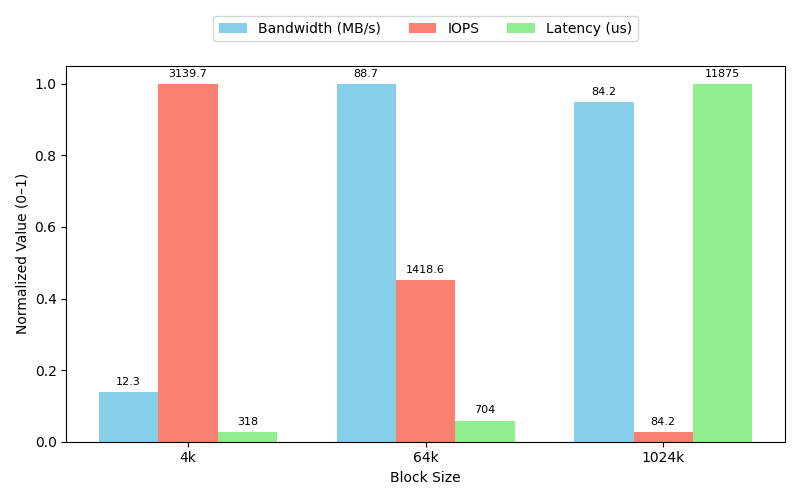
Initially, we can notice that 64k seems to be the sweetspot for the blocksize, having achieved the highest throughput
while also maintaining decent IOPs and minimal sacrifice in terms of latency.
Conclusion
By now, you should be able to automate your I/O benchmarking with fio and even adapt the scripts to your needs. The
config.json file provides plenty of flexibility to test and try out all sorts of combinations. The complete source code
for this post can be found on GitHub.
It’s possible to generate nearly all tests and experiments for all the I/O operations (read, write, rw, etc.) and compare the performance of each configuration to better fine-tune and optimize for your use case. The work can be expanded even further to a full CI/CD pipeline, having each step mentioned in the post (generating commands, executing commands, parsing, etc.) as a separate stage. This concludes our I/O benchmarking, having covered the basics and advanced techniques for automating our tests.